
Constraint-based: An API for your design system
Tailwind cung cấp các class đã được định nghĩa trước, điều này tạo sự ràng buộc nhất định thay vì mỗi người sẽ có 1 kiểu css khác nhau. Chúng giúp nhất quán về màu sắc, khoảng cách, kiểu chữ,... tạo nên một design system tốt.
Build anything: Build whatever you want, seriously
Các class được cung cấp rất sâu giúp ta có thể tác động sâu vào css. Do vậy chúng ta có thể dễ dàng build bất kỳ thứ gì mà ta muốn mà không gặp trở ngại nào.
Performance - It’s tiny: never ship unused CSS again
Tailwind tự động xóa tất cả css không sử dụng khi build product, có nghĩa là gói css sẽ nhỏ nhất có thể.
Mobile-first: Responsive everything
Tailwind cung cấp các tiền tố sm, md, lg, xl, 2xl đặt trước các class để giúp ta dễ dàng responsive
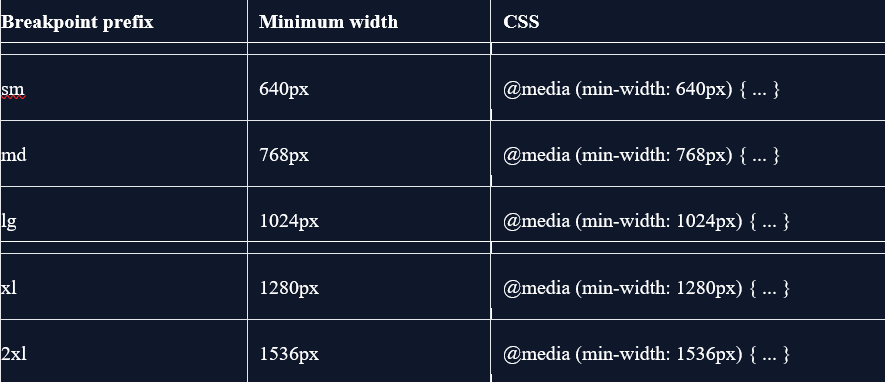
Vd:
<!-- This will center text on mobile, and left align it on screens 640px and wider -->
<div class="text-center sm:text-left"></div>State variants: Hover and focus states? We got ’em
Tương tự như responsive, tailwind còn cung cấp những tiền tố trạng thái(state variants) như hover, focus, active,...
Đặc biệt: Taildwind còn có 1 số state variants được phát minh riêng: group
Khi bạn cần css cho child element dựa trên trạng thái của parent element khác, hãy đánh dấu ‘group’ class cho parent element và đặt ‘group-*’ class chẳng hạn ‘group-hover’ vào child element để tạo kiểu cho child element
Vd: parent element: class=’group’
child element: class=’group-hover:text-white’
Differentiating nested groups: có nhiều group lồng nhau ta có thể sử dụng tên để định danh nó ‘group/{name}’
Vd: parent element: class=’group/item’
child element: class=’group-hover/item:text-white’
Component-driven: Worried about duplication? Don’t be
Việc sử dụng class có thể khiến lặp code rất nhiều. Tuy nhiên, bằng việc dùng các framework như react, vue,... bạn có thể sử dụng component để gom các class lại và tái sử dụng component
Not into component frameworks?: Nếu không sử dụng component hoặc framework không có cơ chế component?: Tailwind cung cấp @apply directive để có thể tạo new class và gom các class lại
Vd:
.btn-blue {
@apply bg-blue-500 hover:bg-blue-700 text-white font-bold py-2 px-4 rounded;
}- Mở rộng: để có thể sử dụng @appy directive ta cần sử dụng thêm @layer directive để xác định layer phù hợp. Có 3 layer: base, component, utilities
- The base layer is for things like reset rules or default styles applied to plain HTML elements.
- The components layer is for class-based styles that you want to be able to override with utilities.
- The utilities layer is for small, single-purpose classes that should always take precedence over any other styles.
@layer base {
h1 {
@apply text-2xl;
}}
@layer components {
.btn-blue {
@apply bg-blue-500 hover:bg-blue-700 text-white font-bold py-2 px-4 rounded;
}}@layer utilities {
.text-white {
color: rgba(255 255 255 0.8);
}}Dark mode: Now with Dark Mode
Tailwind cung cấp một variant gọi là dark tương tự như các variant nó cho phép người dùng sử dụng chế độ dark mode
Tìm hiểu cách setting dark mode: https://tailwindcss.com/docs/dark-mode
Customization: Extend it, tweak it, change it
Tailwind bao gồm các giá trị mặc định được setting sẵn. Tuy nhiên, ta có thể tùy chỉnh để phù hợp với mục đích cá nhân
Thêm các thuộc tính ta muốn chỉnh sửa vào file tailwind.config.js để tạo design system cá nhân,
Tìm hiểu thêm: https://tailwindcss.com/docs/configuration
Modern features: Cutting-edge is our comfort zone
Tailwind hỗ trợ rất nhiều tính năng mới và nâng cao từ css như: grid, transforms, gradients,...
Editor tools: World-class IDE integration
Tăng tốc độ code với Extension thông minh trên VS Code.
Ready-made components: Move even faster with Tailwind UI
Tailwind UI được xây dựng dựa trên tailwind. Nó là tập hợp các UI, template đẹp đã được dựng sẵn và ta chỉ việc lấy ra và sử dụng